A Shopify chargeback is a card payment on your store that the cardholder's bank has reversed. For stores that use Shopify Payments, Shopify's help center says the bank takes the disputed amount and a chargeback fee right away, the money comes out of your next available payout, and you get a deadline for sending evidence.
This guide covers the merchant's side only, using Shopify's help pages as checked in October 2026. Billing Model is an independent site and is not affiliated with Shopify. Fees and screens change, so confirm the current rules in Shopify's chargeback help before acting on a live dispute.
Quick answer: With Shopify Payments, a chargeback shows up on the order in your admin with a due date that Shopify says is usually 7 to 21 days away. Shopify adds order data to the response and sends it on the due date, and you can add evidence or accept. The US fee is $15 per chargeback (checked October 2026). One Shopify help page says the fee is returned if you win, and another says Shopify might refund it depending on your country or region. With any other payment provider, that provider handles the dispute.
What a Shopify chargeback is, and how an inquiry differs
A chargeback starts with the cardholder, not with Shopify. The customer contacts their bank about a charge, and the bank files either a chargeback or an inquiry. Visa's dispute guide for merchants describes the general mechanism: the issuer sends the transaction back to the merchant's acquirer, which deducts the amount from the merchant's account and informs the merchant.
Shopify's page on the chargeback process separates the two forms a dispute can take.
| Chargeback | Inquiry | |
|---|---|---|
| Money taken at the start | The disputed amount and the chargeback fee | Nothing |
| Your task | Send evidence by the due date, or accept | Send evidence by the due date, as for a chargeback |
| If it goes your way | Amount and fee are returned | No action needed |
| If it goes the customer's way | You lose the amount and the fee | It may escalate to a chargeback, with the amount and fee debited |
| Review time Shopify quotes | Up to 75 days after you submit | Usually 65 to 75 days, sometimes longer |
Shopify states plainly that it isn't liable for chargebacks and isn't involved in deciding them. The company that issued the card reviews the evidence and decides.
Every dispute carries a reason. Visa's guide sorts them into four categories: fraud, authorization, processing errors and consumer disputes. Shopify's admin uses its own plainer labels: fraudulent, unrecognized, duplicate, subscription canceled, product not received, product unacceptable, credit not processed and general.
How a chargeback appears in the Shopify admin
Managing a dispute inside the admin requires Shopify Payments. For those stores, Shopify's page on chargebacks in the admin describes four places it shows up:
- Email. A notification goes to the store contact email, which you can check under Settings > Store details.
- The order page. A chargeback banner appears on the disputed order with two buttons, Add evidence and Accept chargeback.
- Chargeback details. A section on the order shows the reason code and, when the bank supplies one, an issuer claim explaining why the dispute was opened.
- The Orders list. Add the filter Chargeback and inquiry status and choose Open to see every dispute that hasn't been sent to the card company yet.
Each dispute has one of five statuses.
| Status | What Shopify says it means |
|---|---|
| Open | Shopify hasn't sent the response yet, and you can still add evidence |
| Submitted | The credit card company is reviewing the evidence |
| Won | You won the chargeback |
| Lost | You lost the chargeback |
| Resolved | Settled automatically through a network dispute resolution program, with the full order amount reimbursed to the customer |
The timeline, with a worked example
Shopify's process page lists six steps: the customer contacts their bank, the bank files the chargeback and withdraws the amount plus the fee, Shopify notifies you with a deadline, you submit evidence, the card company reviews it, and a decision arrives. The outcome can be a win, a partial win or a loss.
Here is that sequence with illustrative dates and amounts for a US store on Shopify Payments.
| Date | Event | Effect on the store |
|---|---|---|
| January 12, 2026 | A customer buys a $120.00 item | +$120.00, less normal processing fees |
| March 3, 2026 | The bank files a chargeback | $120.00 + $15.00 fee = $135.00 deducted from the next available payout |
| March 17, 2026 | Due date shown on the chargeback (14 days in this example). The response is sent | Status moves from Open to Submitted |
| By May 31, 2026 | Decision, up to 75 days after submission | Win: $135.00 returned in the next payout. Loss: nothing returned |
Two checks on the arithmetic. March 17 plus 75 days is May 31: 14 days remain in March, April has 30 and May supplies the last 31. And the amount at stake is $120.00 + $15.00 = $135.00, which is 12.5% more than the sale itself.
The 14 days are an assumption. Shopify says the due date varies from 7 to 21 days after the dispute is filed, is shown in your store's time zone, and falls at 11:59 PM if no time is displayed. Missing it ends your chance to respond. Shopify says no further evidence can be submitted after the deadline, and that the bank's decision is final with no appeal.
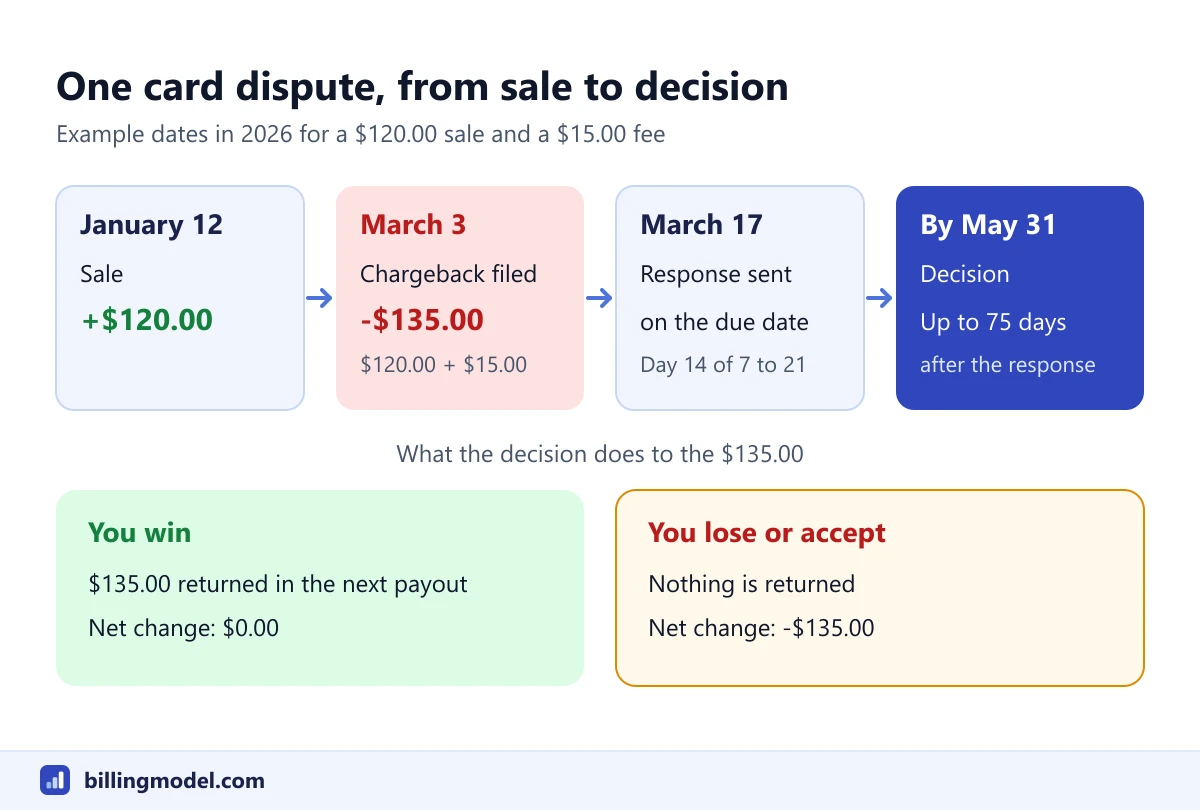 One example dispute from sale to decision. The due date on your own chargeback is the one that counts.
| Outcome | Disputed $120.00 | $15.00 fee | Change from before the dispute |
|---|---|---|---|
| You win | Returned | Returned | $0.00 |
| You lose | Stays with the cardholder | Not returned | -$135.00 |
| You accept | Returned to the customer | Not returned | -$135.00 |
The win row follows Shopify's process page, which says the fee is returned. Its overview page says the fee refund depends on your country or region. If the fee is not refunded, a win leaves the store $15.00 down.
These totals leave out the goods you shipped and the time spent. The guide to the chargeback fee adds those in.
Responding: your evidence and what Shopify sends for you
Shopify does part of the work automatically. For Shopify Payments stores, its help says order information from the admin is added to the response, including order details, shipping and tracking information, the IP address and refund records. Its admin page says Shopify automatically collects evidence and sends it to the credit card company on the due date.
What you add is the material only you hold. The steps are short:
- Open the disputed order and click Add evidence in the banner.
- On the Chargeback response page, review the dispute, enter additional information and upload files.
- Click Save. To send before the due date, click Submit now. After an early submission you can't edit the evidence.
Shopify's file rules are strict: PDF, JPEG or PNG only, no more than 2 MB per file and 4 MB combined, and PDFs under 50 pages. Its page on resolving a chargeback recommends files that stay readable when printed in black and white, because many banks receive evidence by fax.
Three other options are documented:
- Contact the customer. If they agree to drop the dispute, Shopify says you should still submit evidence of that. A withdrawal has to come from the customer's bank.
- Accept the chargeback. The disputed amount goes back to the customer and the fee is not refunded. Visa's guide makes a related point about disputes that can't be remedied: accepting may save the time and expense of contesting.
- Refund during an inquiry. Once a chargeback has started you can't refund through Shopify. During an inquiry, the two help pages differ. The resolving page says a full refund means the cardholder can't initiate a chargeback, while after a partial refund a full chargeback can still occur. Shopify's admin page calls a refund at that stage possible but not recommended. Read both pages before choosing.
What counts as good evidence depends on the reason. The guide to chargeback fraud has a table matching each kind of claim to the records that address it.
The Shopify chargeback fee by country
The fee depends on where the store is based. These are examples from the table on Shopify's chargeback process page (checked October 2026).
| Store country or region | Fee per chargeback |
|---|---|
| United States | $15 USD |
| Canada | $15 CAD or $15 USD |
| United Kingdom | £10 GBP |
| Australia | $25 AUD |
| Germany, France, Spain, Italy, Netherlands | €15 EUR |
| Ireland | €15 EUR + 23% VAT |
| New Zealand | $20 NZD |
| Singapore | $16.35 SGD |
| Hong Kong SAR | $85 HKD |
| Japan | ¥1,300 JPY |
| Mexico | $200 MXN |
The page lists more countries, and several of them, such as Denmark, Sweden and Switzerland, show €15 or an amount in local currency.
On refunds of the fee, Shopify's pages give two statements. The process page says that if you win the chargeback, the fee is returned to you, and the resolving page adds that the full amount plus the fee comes back in your next payout after the decision. The overview page linked at the top of this guide is more cautious: "Shopify might refund the chargeback fee depending on your country or region." None of these pages lists the countries, so confirm with Shopify Support for your store. If you lose or accept, the fee stays charged.
For comparison, the chargeback fee guide lists three other providers' published US fees, which range from $0 to $30 per dispute. That table is not a ranking, and neither is this one.
Watch out: If a payout can't cover a chargeback, Shopify says the balance is debited from the store's bank account in a group of countries that includes the United States, Canada, the United Kingdom and Australia. In other countries it is deducted from future payouts.
Other gateways, automatic resolution and Shopify Protect
Stores on another payment provider. Shopify's help says that if you use a third-party provider, you should contact that provider to find out how to send evidence. It adds that disputes from such providers, with PayPal Express Checkout as its example, may follow different processes and timelines. The fee is whatever that provider charges.
Network dispute resolution programs. Shopify can enroll a Shopify Payments store in a program that settles disputes automatically. Its page on these programs says the customer is reimbursed in full before the dispute becomes a formal chargeback, there is no evidence window, and the merchant pays a fee for each dispute resolved. The amounts it lists match the chargeback fee table above. Stores with a chargeback rate of 1.5% or higher over the last 90 days can be enrolled automatically, and a 10% reserve applies to payouts.
Shopify Protect. For US stores with a US Shopify Payments account, Shopify Protect covers fraudulent chargebacks on eligible Shop Pay orders. On a protected order, Shopify says the disputed amount and the fee are debited and then immediately reimbursed, and the merchant doesn't need to act. Eligibility has conditions: physical items only, fulfillment within 7 days with a valid tracking number, and in transit within 10 days. It doesn't cover claims such as non-receipt or items not as described. Only the first order of a subscription is protected, a point that matters for Shopify recurring payments.
Preventing chargebacks on a Shopify store
Shopify's prevention page ties each measure to a dispute reason:
- Fraudulent or unrecognized. Review flagged orders with fraud analysis before fulfilling. Set a customer statement name that buyers will recognize, a Shopify Payments setting. For physical goods shipped to the US, UK or Canada, ship only orders that pass the address verification check, or contact the customer first.
- Subscription canceled. Cancel promptly when asked and send a confirmation. State on the sign-up page that the customer agrees to recurring charges, and publish a cancellation policy.
- Product not received. Ship soon after payment, provide tracking and tell customers about delays.
- Product unacceptable. Keep images and descriptions accurate, and pack goods to survive transit.
- Credit not processed. Publish a clear return policy and issue refunds quickly.
- Duplicate. Refund accidental double charges at once.
Prevention matters more than winning, because of how the rate is counted. Shopify says its chargeback rate includes every dispute a customer opens, and that a dispute resolved in your favor still counts. A high rate can lead to a reserve on payouts or enrollment in automatic resolution.
Fraud deserves the first look. A Federal Reserve Bank of Kansas City working paper on one year of US data, October 2013 to September 2014, found that fraud accounted for about 50% of Visa and Mastercard chargebacks, and that rates were significantly higher for card-not-present sales such as online orders. The data is old and covers one country, so treat it as a baseline.
The wider checklist, including how Visa's monitoring thresholds work, is in the guide to chargeback prevention.
Frequently asked questions
Does Shopify refund the chargeback fee if I win?
Shopify's help pages give two answers for Shopify Payments. The process and resolving pages say the disputed amount and the fee are returned when you win, in your next payout after the decision. The overview page says Shopify might refund the fee depending on your country or region. If you lose or accept the chargeback, the fee is not refunded.
How long do I have to respond to a Shopify chargeback?
Until the due date shown on the chargeback, which Shopify says varies from 7 to 21 days after the dispute is filed. After that date no further evidence can be submitted, so add yours early.
Does Shopify fight chargebacks for me?
Partly. With Shopify Payments it fills in order data and submits the response on the due date, but it doesn't decide the outcome and says it isn't liable for chargebacks. Any evidence that only you hold, such as emails with the customer, has to be added by you.
What happens with a chargeback if I don't use Shopify Payments?
The dispute is handled by your payment provider under its own process, deadlines and fees. Shopify's help tells merchants in that position to contact the provider about how to send evidence.
Can I just refund the customer once a chargeback is filed?
No. Shopify says a refund can't be issued after a cardholder initiates a chargeback. The customer would have to withdraw the dispute through their bank first, and banks can take up to 30 to 90 days to update the status.