Shopify recurring payments are set up as subscriptions: a product gets a subscription purchase option, the customer agrees to it at checkout, and an app charges the saved payment method at each renewal. The Shopify admin doesn't do this on its own. Shopify's help center says you need a subscription app from the Shopify App Store, such as its free first-party Shopify Subscriptions app.
This guide describes how the pieces fit together according to Shopify's help and developer pages, all checked in October 2026. Billing Model is an independent site and is not affiliated with Shopify. Features change, so confirm current behavior in Shopify's subscription help before you rely on a detail.
Quick answer: Recurring payments on Shopify need three things: a subscription app, a supported payment gateway and a product with a subscription plan attached. The customer consents at checkout, Shopify stores the payment method, and the app bills each renewal and creates a new order. Shopify's help says customers are billed the day after the subscription is due, at 10:00 am in the store's local time.
How Shopify recurring payments work
Four objects sit behind every subscription. The names come from Shopify's developer documentation on selling plans and subscription contracts.
| Term | What it is | Where a merchant meets it |
|---|---|---|
| Selling plan | The rule for how a product is sold, for example billed and delivered monthly at a 15% discount | A frequency and discount option inside a subscription plan |
| Selling plan group | A set of selling plans offered together, such as weekly and monthly delivery | The subscription plan attached to a product |
| Subscription contract | The agreement between one customer and the store: items, schedule and price | The Contracts list in the subscription app |
| Billing attempt | One try at charging the saved payment method for one billing cycle | A renewal that either creates an order or fails |
Each selling plan carries a billing policy (how often the customer is charged), a delivery policy (how often orders ship) and a pricing policy (the discount or price). When a customer buys a product on a selling plan, Shopify generates the contract and passes it to the app.
The developer pages also describe two subscription types. With pay-per-delivery, which Shopify also calls "Subscribe and save", the customer pays for each delivery and a new order is created each time. With prepaid, the customer pays once up front and receives deliveries on a schedule.
The app starts each billing attempt, so retry rules, reminder emails and the customer's self-service page depend on the app a store installs. The specifics below are for the Shopify Subscriptions app, because that is the one Shopify's help center documents. Third-party apps have their own settings, and none is recommended here. The general cycle behind any subscription is in the guide to subscription billing.
What a store needs before it can sell subscriptions
Shopify's page on considerations and payment gateways for subscription products sets the conditions (checked October 2026).
A supported payment gateway. The page lists five, and says availability depends on your region and the gateway's terms of service.
| Gateway | What Shopify's help page says about it |
|---|---|
| Shopify Payments | Supports automatic card updates and accelerated checkouts. Apple Pay for subscriptions is limited to Visa and Mastercard |
| PayPal Express | PayPal can be used as the gateway and as a wallet. Third-party transaction fees apply if Shopify Payments isn't activated |
| Authorize.net | PayPal is the only wallet option. Google Pay and Apple Pay aren't supported |
| Adyen | Works through checkout-integrated subscription apps. Not every Adyen payment method works for subscriptions |
| Stripe | Available only to select merchants |
A payment method that can be billed again. The page says local, manual or non-credit-card payment methods might not be available for subscriptions. Shopify stores the payment details, and a merchant can't see full card numbers after they are entered.
A supported sales channel. Subscription products work only on the online store, Shopify POS, Shop and custom storefronts. They can't be used with draft orders. Shopify's developer page adds that in-person subscription sales through POS need Shopify Payments.
A compatible theme. The Shopify Subscriptions app needs a theme that supports sections and blocks. Bundles aren't compatible with that app.
Setting up a subscription plan
In the Shopify Subscriptions app, a plan is created in a few steps. They are listed on Shopify's page for creating and editing subscription plans.
- Go to Apps > Subscriptions, click Plans, then Create plan.
- Enter a Title, which customers see, and an Internal description, which they don't.
- Add products.
- Under Discount and frequency options, pick a discount type (percentage off, amount off or fixed price) and a delivery frequency in weeks, months or years.
- Optionally set a specific billing day, or end the subscription after a set number of orders.
- Save. The app's setup page then has you add the subscription widget to the product template in the theme editor.
A product can be sold both ways or as a subscription only. Subscription-only products can be sold on the online store channel alone.
The disclosure and the cancellation policy
Setting up a subscription automatically adds a purchase options cancellation policy to the store, linked from the checkout footer. If you leave it blank, customers see a generated template.
Checkout also shows a subscription disclosure that the customer has to accept. Shopify says it can't be removed on any plan, and that editing its agreement label and consent text requires the Shopify Plus plan. Its help page tells merchants to review custom wording with their legal team.
Consent rules apply to Shopify recurring payments as they do to any other subscription. In the United States, the Restore Online Shoppers' Confidence Act sets three conditions for online charges that continue until canceled: disclose all material terms before taking billing information, get express informed consent, and provide simple mechanisms to stop the charges. Visa's policy for subscription merchants, a June 2019 notice for its regions outside Europe, requires the cardholder's express consent at enrollment. Other countries have their own rules, and a lawyer should confirm what applies to your customers. The guide to setting up recurring payments covers authorization in more depth.
A worked example with dates and amounts
The numbers are illustrative. A store sells a bag of coffee for $18.00 and adds a plan: deliver every 1 month, 10% off. The subscription price is $18.00 × 0.90 = $16.20 per delivery. Shipping and tax are left out to keep the math simple.
In the app's settings the store has chosen 3 retry attempts, 3 days apart, and to pause the subscription when every retry fails. Those are this example's choices. Shopify's settings page doesn't state default values.
| Date in 2026 | What happens | Charged |
|---|---|---|
| March 3 | The customer checks out and accepts the disclosure. Order 1 and a subscription contract are created | $16.20 |
| April 1 | Reminder email, 3 days before the charge | |
| April 4, 10:00 am | The renewal due April 3 is billed the next day. Order 2 | $16.20 |
| May 4, 10:00 am | The renewal due May 3 is billed. Order 3 | $16.20 |
| June 4 | The renewal due June 3 is attempted and the card is declined | $0.00 |
| June 7, 10 and 13 | Three retries, 3 days apart, all fail | $0.00 |
| June 13 | The subscription is paused and the customer is notified |
The store collected 3 × $16.20 = $48.60. Three one-time purchases would have been 3 × $18.00 = $54.00, so the discount cost $5.40.
The April and May dates apply the rule on Shopify's considerations page, that customers are billed the day after the subscription is due. Check the next order date on a contract in your own store. The guide to the billing period explains how billing dates and service dates relate.
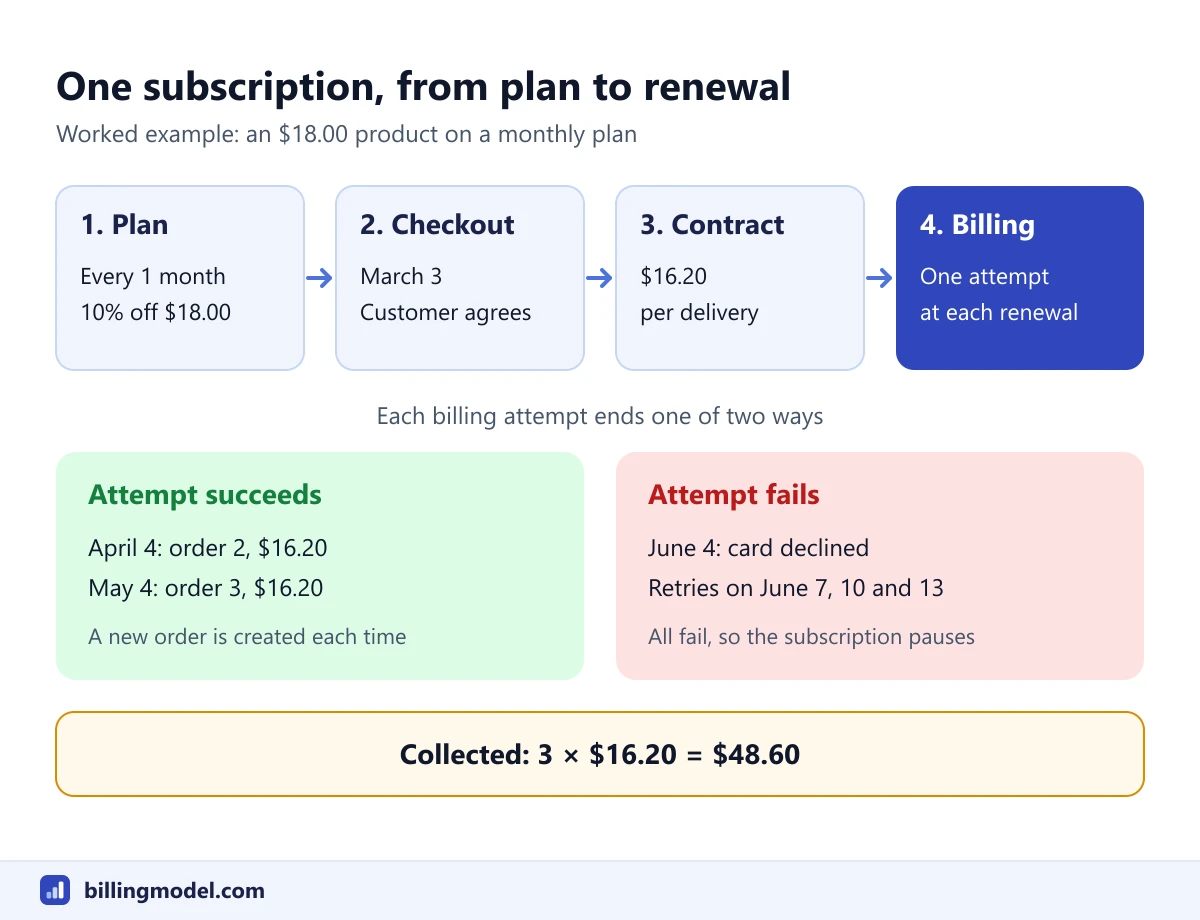 The worked example: three payments of $16.20, then a failed renewal that ends in a pause.
If this store took payments through a third-party provider instead of Shopify Payments, Shopify's pricing page lists a third-party transaction fee of 2% on Basic, 1% on Grow, 0.6% on Advanced and 0.2% on Plus (US page, checked October 2026). On a $16.20 renewal, 2% works out to about $0.32, on top of the provider's own charges.
When a renewal payment fails
What happens next is a setting. In the Shopify Subscriptions app, the app settings page has a billing attempts section with three controls: Number of retry attempts, Days between payment retry attempts and Action when all retry attempts have failed. The action can be to skip the order, pause the subscription or cancel it, and Shopify says the customer is notified in each case.
The same section covers a second kind of failure, when a product doesn't have enough inventory to create the order. It has its own retry settings, and the page says you can choose whether subscription products track inventory.
Several other documented behaviors affect failed renewals:
- Card updates. With Shopify Payments, saved card details can update automatically when a customer gets a new card. Shopify says this is widely supported in the United States for major card networks and varies elsewhere.
- Bank challenges. A customer's bank may challenge a recurring charge. Shopify then emails the customer with the subject "Confirm payment for your subscription" and a link to confirm.
- A new card by link. From the customer's profile, a merchant can choose Send link to update card. The link expires after 48 hours.
- High-risk first orders. If the first subscription order is flagged as high risk and left unfulfilled, later renewals fail.
Retries are not unlimited under card network rules. A Visa rules notice dated September 3, 2020 allows up to 15 reattempts in 30 days for declines in its "issuer cannot approve at this time" category, and says a decline for an invalid account number must not be retried on the same number. The example's three retries sit well inside that. The guide to handling a failed payment explains the categories.
Note: Shopify's fraud analysis page says fraud recommendations aren't provided for subscription renewals. Disputes on renewals are covered in the guide to a Shopify chargeback.
What customers can manage themselves
With the Shopify Subscriptions app, customers manage a subscription from their customer account. Shopify's customer experience page says they sign in with their email address and a 6-digit code, from the store's menu or from the "Manage your subscription" link in subscription emails. The merchant first has to add the subscription management page to customer accounts in the checkout settings.
Once signed in, a customer can:
- skip the next order, or several
- pause, which takes effect immediately and stops charges and upcoming orders
- resume a paused subscription
- cancel, which ends billing and delivery immediately and can't be undone
- replace the payment method
- edit the shipping address
The app also emails the customer 3 days before each recurring order is charged. Subscriptions run by a third-party app follow that app's own notification schedule.
One detail from the considerations page is easy to miss. If a customer deletes a card from their Shop Pay account, active subscriptions linked to that card continue until the customer cancels them separately.
Card rules cover cancellation too. Visa's subscription policy, which covers subscriptions that begin with a free trial or introductory offer, says canceling online should be about as simple as unsubscribing from an email list.
How subscription orders appear in the admin
Renewals show up in the places a merchant already works, according to Shopify's pages on managing subscription orders and customer subscriptions.
- Orders. Each pay-per-delivery renewal is a new order in the Orders list, fulfilled like any other. A prepaid subscription is one order that shows a Scheduled status and switches to Unfulfilled when each fulfillment date arrives. Editing an order doesn't change the subscription contract.
- Customers. The customer list can be filtered by Product subscription status: active, paused, canceled, expired, never subscribed or failed payment. A customer's profile shows active subscriptions and the next order date.
- Contracts. In the Shopify Subscriptions app, Apps > Subscriptions > Contracts lists every contract. Staff can edit products and frequency there, skip an order, pause or cancel.
- Reports. Shopify says subscription data is available in all sales reports.
Frequently asked questions
Does Shopify have built-in recurring payments?
Not without an app. Shopify's help says that with a subscription app you manage subscription products in the Shopify admin, and it describes its own Shopify Subscriptions app as free. A separate Shopify page comparing the app with pricing plans says it may involve additional fees depending on setup.
Do I need Shopify Payments to sell subscriptions?
Not for the online store. Shopify lists Shopify Payments, PayPal Express, Authorize.net, Adyen and Stripe as supported gateways, subject to region and each gateway's terms. Automatic card updates are described for Shopify Payments, and in-person subscription sales through POS require it.
When is a customer charged for a renewal?
Shopify's considerations page says customers are billed the day after the subscription is due, at 10:00 am in the store's local time. With the Shopify Subscriptions app, a reminder goes out 3 days before the charge.
What happens to subscriptions if I uninstall the app?
For the Shopify Subscriptions app, Shopify says plans, contracts and the app's discounts are deleted and no longer accessible. For third-party apps, its help says subscription data created in the app is deleted after 48 hours, apart from subscription contracts and customer payment information. Read the current page before uninstalling anything.