A recurring invoice is an invoice your accounting or billing system creates automatically on a schedule, with the same customer, line items and payment terms each time. You set it up once. After that a new numbered invoice goes out every week, month or quarter until the schedule ends.
It fits work that is billed the same way again and again: retainers, rent, maintenance contracts, software paid by invoice. One thing it does not do is collect the money. It asks for payment, and the customer still has to pay.
Quick answer: A recurring invoice is a saved invoice template plus a schedule. You choose the frequency, start and end dates, payment terms and numbering, and the system issues a separate invoice each period. Each one is its own bill with its own number, date and due date.
What a recurring invoice is
Think of it as two parts: a template that says who is billed and for what, and a schedule that says when. Every time the schedule fires, the system copies the template into a real invoice, gives it the next number and today's date, and works out the due date from the terms.
Each copy is a separate receivable. OpenStax's finance textbook notes that accounts receivable are evidenced by an invoice and that a receivable's age is counted from the invoice date. Twelve monthly invoices are twelve debts, each on its own clock.
Organizations that pay bills use the same idea from the other side. Yale's procurement office describes recurring payments, "also known as recurring invoices", as a way to handle fixed amounts that fall due at regular intervals, such as monthly or semi-annually, over a set period. It adds that utility bills, which vary in amount, can be set up this way too.
Recurring invoice vs recurring payment vs one-off invoice
These three get mixed up because billing software often puts them on the same screen. The difference is who has to act for money to move.
| Recurring invoice | Recurring payment | One-off invoice | |
|---|---|---|---|
| What it is | A bill issued on a schedule | A charge taken on a schedule | A single bill |
| Who moves the money | The customer, each time | The business, under an authorization | The customer, once |
| What you need first | Agreed price and terms | Permission to debit a card or account | An order or finished job |
| Typical use | Retainers, rent, business contracts | Memberships, consumer subscriptions | Projects, one-time sales |
| Main risk | Late payment | Failed or disputed charge | Late payment |
A recurring payment needs the payer's permission. In the United States, Regulation E says preauthorized electronic transfers from a consumer's account may be authorized only by a writing signed or similarly authenticated by the consumer. Other countries have their own mandate rules. An invoice needs no such permission, because it takes nothing.
The two also end separately. The US Consumer Financial Protection Bureau tells consumers that cancelling an automatic payment "does not cancel what you owe". The reverse holds for a seller: stopping the invoice schedule doesn't stop a debit that is still authorized.
Many businesses pair them: the invoice goes out on the 1st and the amount is collected automatically a few days later. The guides to setting up recurring payments and the recurring ACH payment cover the collection side.
What to set on a recurring invoice
Most systems ask for the same handful of settings.
Frequency
Match the contract, not habit. If the agreement says quarterly in advance, a monthly schedule creates three times the paperwork and a confused customer. Monthly is a common default: Ohio State's controller, for example, tells its units that monthly invoicing and reconciliation are mandatory.
Start date and end date
The start date is the first invoice date, not the date you created the schedule. The end can be a fixed date, a number of invoices, or open until canceled. Yale asks staff who request a recurring payment for the start and end dates, the amount and whether it will vary, and whether a signed agreement sits behind it. Those are sensible questions for a seller as well.
Payment terms
Terms decide each due date. The same OpenStax chapter defines credit terms as the parts of a sales agreement that say when payment is due, and notes that net terms usually run between 30 and 90 days depending on the industry. Practice varies even among similar organizations. Ohio State uses Net 30, while UC Berkeley's non-student billing guidelines make payment due on receipt unless otherwise negotiated and tell departments not to agree to more than 30 days from the invoice date. The guide to invoice payment terms compares the options, and net 30 on an invoice is covered separately.
Numbering
Every invoice in the series needs its own number, never a copy of the template's. In the UK, GOV.UK's list of what an invoice must include starts with a unique identification number. In the EU, the European Commission's VAT invoicing rules list a unique sequential number among the contents of a full VAT invoice. Let the system assign the next number in your normal sequence. Requirements differ by country, so check the rules where you and your customer are registered.
Description and service period
Because the wording repeats, add the period to each line: "IT support retainer, January 2027". The GOV.UK list also asks for a clear description of what you're charging for and the date the goods or service were provided. Without the period, twelve identical invoices are hard to match to twelve payments.
A filled-in recurring invoice example
Here is a made-up monthly retainer with two lines. Adapt it to your own business, and have a professional review important documents and tax wording.
RECURRING SCHEDULE
Customer:        Harbor Dental Clinic (example)
Frequency:       Monthly, on the 1st
Start date:      January 1, 2027
End:             After 12 invoices (last one December 1, 2027)
Payment terms:   Net 30
Numbering:       Next number in the INV-2027 series
Delivery:        Email on the invoice date

INVOICE INV-2027-001
Invoice date:    January 1, 2027
Due date:        January 31, 2027
Service period:  January 1 to January 31, 2027

Description                             Qty   Unit price      Amount
IT support retainer, January 2027         1    $1,200.00   $1,200.00
Hosted backup, per workstation            4       $15.00      $60.00
                                                Subtotal   $1,260.00
                                                Tax            $0.00
                                                Total due  $1,260.00
The arithmetic: 1 × $1,200.00 = $1,200.00, plus 4 × $15.00 = $60.00, gives $1,260.00. Over the year the schedule bills 12 × $1,260.00 = $15,120.00. Tax is shown as zero only to keep the example simple.
The first three invoices look like this, with each due date set 30 days after the invoice date:
| Invoice | Invoice date | Service period | Due date | Amount |
|---|---|---|---|---|
| INV-2027-001 | January 1, 2027 | January 1 to 31 | January 31, 2027 | $1,260.00 |
| INV-2027-002 | February 1, 2027 | February 1 to 28 | March 3, 2027 | $1,260.00 |
| INV-2027-003 | March 1, 2027 | March 1 to 31 | March 31, 2027 | $1,260.00 |
Notice the February invoice. Thirty days from February 1 lands on March 3, not on the last day of the month. If you want every invoice due at month end, set the terms that way instead of relying on net 30.
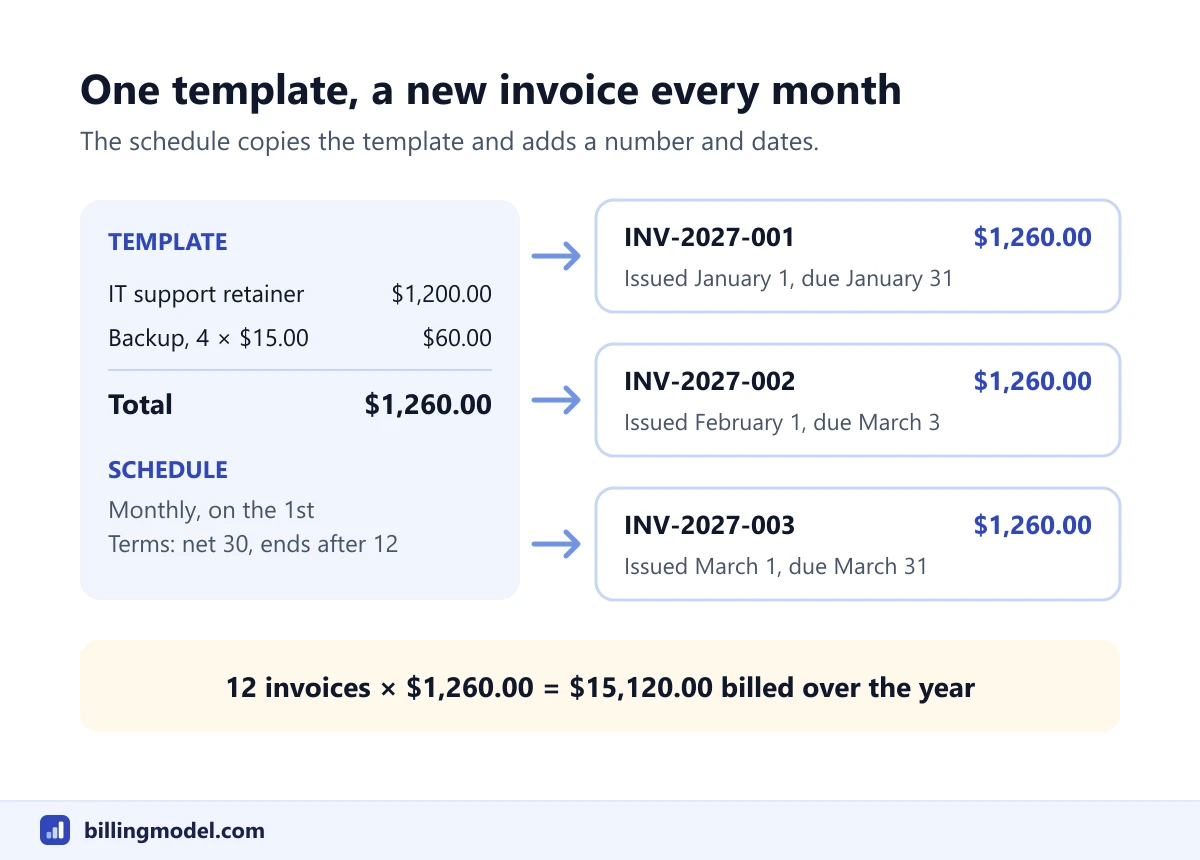 One template and a monthly schedule produce a separate numbered invoice each period.
Common recurring invoice mistakes
- No end date on a fixed-term contract. The schedule keeps billing after the work stops, and each wrong invoice then has to be reversed. The credit memo example shows how that correction is documented.
- A stale template. Prices, quantities and tax rates change. Editing the template affects future invoices only, so update it before the next run.
- Double billing the first month. If you already sent a manual invoice for January, start the schedule in February.
- Treating "sent" as "paid". Automation hides unpaid invoices. Ohio State's guidance asks units to review aging reports at least every 30 days, and an accounts receivable aging report is the tool for it.
- Changing an auto-debited amount without warning. Where an invoice is paid by preauthorized debit from a US consumer account, Regulation E requires written notice at least 10 days before a transfer that differs from the previous amount. Rules elsewhere differ.
Watch out: Pausing a schedule doesn't cancel invoices already issued. Those stay open until they are paid or credited, and they follow the normal process for a past due invoice.
When a recurring invoice is the wrong tool
It works when the amount and the timing are both predictable. It fits poorly in three cases.
If the amount changes every period, as with hourly work or metered usage, a fixed template will be wrong most months. Have the system create a draft for review, or bill from usage data.
If customers upgrade, downgrade or add seats between billing dates, you need proration and plan logic. That is subscription billing, and the billing period guide explains the dates behind it.
If the job happens once, send a one-off invoice.
Frequently asked questions
Does a recurring invoice charge the customer automatically?
No. It only issues the bill. The customer pays it by whatever method the invoice allows, unless you have separately set up an authorized automatic payment that collects the amount.
Is a recurring invoice the same as a subscription?
Not quite. A subscription is the agreement to keep providing something for a repeating fee. A recurring invoice is one way to bill for it, and it is equally common for retainers, leases and service contracts that nobody would call a subscription.
How are recurring invoices numbered?
Each one takes the next number in your invoice sequence, the same as an invoice typed by hand. In the example above the series runs INV-2027-001, 002, 003, assuming no other invoices are issued in between.
Can I change the amount on a recurring invoice?
Yes, by editing the template or schedule. The change applies to invoices created afterward. An invoice that has already been issued is corrected with a credit memo or a replacement invoice, according to your accounting rules.
How do I stop a recurring invoice?
End or delete the schedule in your billing system, and tell the customer. Invoices that were already issued remain due, and any separate automatic payment authorization has to be canceled as well.