Square recurring payments can be set up in three documented ways: a recurring invoice series with automatic payments, a card kept on file that you charge yourself, or a subscription plan built from your item library. Each one collects on a schedule, but they differ in who triggers the charge and how the customer stops it.
This guide describes each option from Square's US help center and US fee pages, all checked in October 2026. Square publishes separate help and pricing pages for other countries, where features and rates differ. Billing Model is an independent site and is not affiliated with Square, so confirm current behavior in Square's help center before you rely on a detail.
Quick answer: Square offers recurring invoices (a series that can charge a saved card or bank account automatically), Card on File (you charge a stored card when payment is due) and Square Subscriptions (plans attached to items). Square's help requires the cardholder's consent for recurring invoices and a signed authorization for Card on File. Its US fees page lists 3.3% + 30¢ for online or invoice payments on Square Free and 3.5% + 15¢ for card on file (checked October 2026).
The three ways to take Square recurring payments
The options overlap, so it helps to see them side by side. The table describes them and is not a ranking.
| Recurring invoice series | Card on File | Square Subscriptions | |
|---|---|---|---|
| What repeats | An invoice is sent on a schedule. With automatic payments on, the saved card or bank account is charged | Nothing by itself. You charge the stored card each time | A plan bills the customer each billing cycle |
| Where it lives | Invoices > Recurring series in Square Dashboard, or the Point of Sale app | The customer's profile in the Customer Directory | Subscription plans and Subscriptions in Square Dashboard |
| Consent Square's help describes | One-time consent from the cardholder | Signed authorization from the customer | Not spelled out on the plan page. The customer gets a confirmation email |
| How the customer steps out | Removes the saved card or bank account, or withdraws permission | Removes the card through a link in Card on File emails | Cancels through the Manage subscription link |
A recurring invoice that the customer pays by hand each time is a different thing from a recurring payment. The guide to the recurring invoice explains that difference.
Recurring invoices: a series with automatic payments
Square's page on creating and sending recurring invoices says the feature is open to Square Invoices Free and Plus subscribers and to Square Free, Plus and Premium subscribers. The setup in Square Dashboard runs like this:
- Go to Invoices > Recurring series and click Create recurring series.
- Select the customer, or add one with a name, phone number and email address.
- Add the invoice details and line items.
- Under Recurring schedule, choose how often invoices are sent, then set the start date, end date and due date.
- To collect automatically, check Allow automatic payments with card or bank on file.
- Click Send, or Schedule for a future start date.
The customer does the rest on the first invoice. They can save their card when they pay it. For a bank account, Square says the customer selects Pay by bank transfer, verifies the account through Plaid and checks a box to save it. Later invoices in the series are then charged to the saved method.
Three details from Square's help are worth knowing:
- Timing. A card on file is charged on the due date of each recurring invoice. For a scheduled card-on-file payment, Square gives the time as 10:00 AM in your local time zone.
- Numbering. Recurring invoices follow an ID convention similar to 000001-R-0001.
- Early notice. If the series is set up as a delayed charge, meaning payment is due later than the invoice date, the customer gets an email on each invoice date with two options: Make early payment or Update payment method.
Card on File: authorization comes first
Card on File stores a customer's card in your Customer Directory so you can charge it later from the Point of Sale app, Virtual Terminal or Square Invoices. It doesn't run a schedule on its own.
Square's page on using Card on File puts permission before anything else. It says you need the customer's signed authorization to save their card, provides a card authorization form to download, and tells sellers to upload the signed copy to the customer's profile. The page gives the reason as protecting you from chargeback liability.
Storing and charging takes a few steps in Square Dashboard:
- Go to Customers > Customer directory and select the customer.
- Under Payment on File, add the card and click Save. The customer gets a confirmation email.
- When payment is due, take the payment and choose Card on File. A receipt is emailed to the address on the profile.
Square notes two limits. Card details from Apple Pay, Google Pay or Samsung Pay sales can't be saved, and an expired card has to be unlinked from the profile by you or the customer.
Square's consent requirements sit on top of law and card rules. Visa's policy for subscription merchants, a June 2019 notice for its regions outside Europe, requires the cardholder's express consent to an ongoing subscription at enrollment. For bank accounts in the United States, Regulation E says preauthorized transfers from a consumer's account may be authorized only by a writing signed or similarly authenticated by the consumer. Other countries have their own mandate rules, and a lawyer should confirm what applies to you. The guide to setting up recurring payments covers authorization wording and notices.
Square Subscriptions: plans attached to items
Square Subscriptions turns an item in your library into something customers can subscribe to. Square's page on item subscription plans says it is available to Square Subscriptions users, Square Online Plus and Premium subscribers, and Square Plus and Premium subscribers.
A plan is created in Square Dashboard:
- Go to Items & services > Subscription plans and click Create plan. The plan name is visible only to you.
- Click Assign items and choose the items.
- Click Add frequency option and set when billing starts: at the time the subscription starts, on the last day of each month, or on a date you choose. Square says choosing a date is available only for new monthly plans.
- Set the end. The default is never, or the plan can end after a set number of billing cycles.
- Optionally add a discount for that frequency, and turn on Pause subscriptions with a pause limit.
To subscribe a customer yourself, go to Subscriptions, click Create subscription, pick the customer, plan and frequency, and enter payment details or send an invoice by email. The customer receives a confirmation email with a Manage subscription link.
Square lists several things subscriptions can't do, among them pickup as a fulfillment option, custom billing dates such as billing every subscription on the 1st, changing a plan's price after it is created, and minimum commitment periods. Plans can be managed in Square Dashboard and the Point of Sale app on iOS, but not on Android devices.
What Square recurring payments cost
Square charges per payment, and the rate depends on how the payment is taken and which Square plan you are on. These rows come from Square's US page on its fees (checked October 2026).
| Payment type | Square Free | Square Plus | Square Premium |
|---|---|---|---|
| Online or invoices | 3.3% + 30¢ | 2.9% + 30¢ | 2.9% + 30¢ |
| Manual entry or card on file | 3.5% + 15¢ | 3.5% + 15¢ | 3.5% + 15¢ |
| ACH bank transfer by invoice | 1%, $1 minimum | 1%, $1 minimum, $10 cap | 1%, $1 minimum, $10 cap |
For subscriptions, the item subscription page says there are no monthly fees or fixed costs for Square Subscriptions. The fees page lists a subscription payment rate only for legacy plans, at 3.3% + 30¢. Sellers on older plans or custom pricing may see other rates, and Square points them to the Pricing & subscriptions page in their Dashboard.
A worked example with dates and amounts
The numbers are illustrative. A design studio bills a client $150.00 a month through a recurring series, with invoices sent on the 5th and due on the 12th.
| Date in 2026 | What happens |
|---|---|
| January 5 | Invoice 1 is sent. The customer pays $150.00 online and saves the card |
| February 5 | Invoice 2 is sent, with the early payment and update options |
| February 12 | The saved card is charged $150.00 |
| March 5 | Invoice 3 is sent |
| March 12 | The charge is declined. Square notifies the customer and does not retry |
| March 14 | The customer enters a new card and pays $150.00 |
Three payments bring in 3 × $150.00 = $450.00 before fees. The fee on each one depends on the rate that applies:
| Rate | Fee on $150.00 | Net per payment | Fees over 12 payments |
|---|---|---|---|
| 3.5% + 15¢ | $5.25 + $0.15 = $5.40 | $144.60 | $64.80 |
| 3.3% + 30¢ | $4.95 + $0.30 = $5.25 | $144.75 | $63.00 |
| 2.9% + 30¢ | $4.35 + $0.30 = $4.65 | $145.35 | $55.80 |
| 1% by ACH | $1.50 | $148.50 | $18.00 |
That arithmetic is this guide's, worked from Square's published rates. Twelve payments total 12 × $150.00 = $1,800.00, so the gap between the highest and lowest rows is $64.80 minus $18.00, or $46.80 a year on this one client.
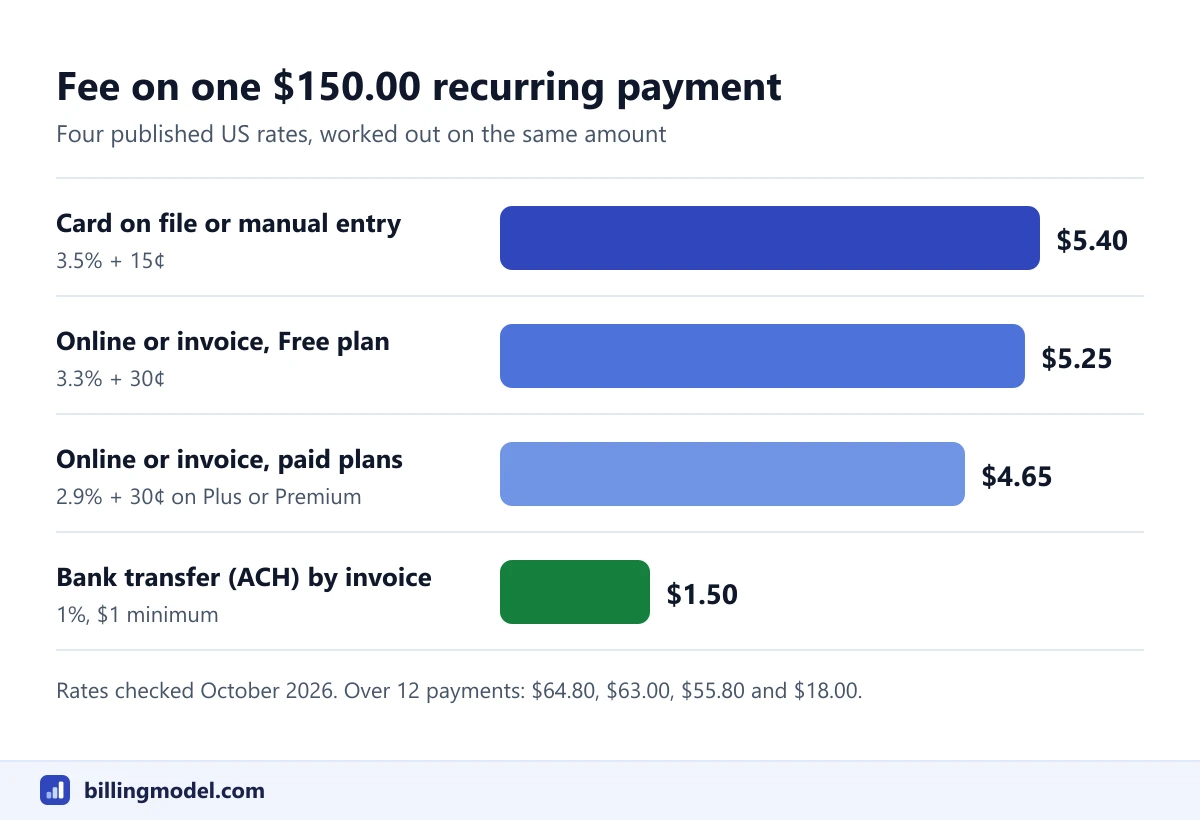 The fee on one $150.00 payment at four rates from Square's US fees page, checked October 2026.
Watch out: Square's fees page lists "online or invoices" and "card on file" as separate rates, and it doesn't say which one applies when an invoice is paid automatically from a saved card. Check a processed payment in your own Dashboard before you budget on either figure.
When a card is declined
For recurring invoices, Square's help is direct: it will not automatically attempt to re-process declined payments. If a recurring invoice payment is declined, Square notifies the customer immediately by the method used to share the invoice, email or text.
From there the fix is manual. Square's page on payment methods on file with invoices says that when a card on file fails, a new invoice is sent so the customer can enter new card details, which can be saved for later invoices. If the card behind a series has changed or expired, the seller edits the series so the correct card is charged. Square's invoice troubleshooting page adds that Square isn't told the exact reason for a decline, so the customer has to ask their card issuer.
For subscription plans, the help article consulted for this guide doesn't describe what happens when a subscription payment fails, so no retry behavior is stated here. What it does document is that customers can update their payment information through the Manage subscription link and that a seller can pause a subscription. Ask Square support how failures are handled on your account.
Because Square leaves the follow-up to you, write your own policy for reminders, grace periods and pauses. The guide to handling a failed payment has a schedule to adapt, along with the card network limits on re-charging a declined card.
How customers cancel, and how you end it
Each option has its own exit, on both sides.
| Option | What the customer can do | What the seller can do |
|---|---|---|
| Recurring invoice series | Choose Update payment method in the invoice email, then remove the card or bank on file | End recurring series. Square says any outstanding invoices will still apply |
| Card on File | Use the link in a Card on File email to view and remove cards linked to your business | Delete the card from the customer's profile |
| Square Subscriptions | Use Manage subscription to cancel, or to pause and resume if you've enabled it | Cancel subscription or Pause subscription. The customer is notified |
Square describes recurring invoicing as running until the cardholder withdraws permission. Card rules are strict about what follows. Visa's dispute guide for merchants says a merchant is prohibited from billing the Visa account after a cancellation request has been received, and must ask for another form of payment if a balance is still due.
Customers also have routes outside Square. In the United States, Regulation E lets a consumer stop a preauthorized bank debit by notifying their bank at least three business days before the scheduled date. The Consumer Financial Protection Bureau's guidance on stopping automatic payments reminds consumers that canceling an automatic payment doesn't cancel what they owe, so an ended series can still leave an open invoice to collect.
One more distinction: deactivating a subscription plan doesn't cancel anyone. Square says existing subscriptions to a deactivated plan keep renewing until they are canceled.
Frequently asked questions
Does Square charge a monthly fee for recurring payments?
Square's invoices pricing page lists recurring invoices among the features of its free plan (checked October 2026), and its help says Square Subscriptions has no monthly fees or fixed costs. Processing fees apply to each payment, at the rates on Square's fees page for your plan.
Does Square retry a declined recurring payment?
Not for recurring invoices. Square's help says it will not automatically attempt to re-process declined payments, and that it notifies the customer immediately. The seller or the customer has to supply a working payment method.
Can a customer pay a recurring invoice from a bank account?
Yes, in the United States. The seller allows automatic payments with card or bank on file, and the customer verifies the account through Plaid on the first invoice. Square's fees page lists ACH bank transfers by invoice at 1% with a $1 minimum, capped at $10 on Square Plus and Premium (checked October 2026).
Do I need the customer's permission to keep a card on file?
Yes. Square's Card on File page says you need the customer's signed authorization to save their card, and its recurring invoices page requires one-time consent from the cardholder. Keep the signed form with the customer's profile.
Are Square recurring payments the same outside the United States?
Not necessarily. This guide uses Square's US help center and US fees. Square publishes separate pages for other countries, so check the version for the country your account is registered in.