Setting up recurring payments with PayPal as a business means using PayPal Subscriptions: you define a product, attach a plan with a price and billing cycle, and give customers a button that signs them up. After that PayPal charges each subscriber on schedule.
This guide follows PayPal's developer documentation and help pages as opened in October 2026. It describes what those pages say, including what customers see, how they cancel and what PayPal does when a payment fails. It doesn't recommend the product.
Quick answer: In a PayPal Business account, go to Sales, then Subscriptions, then Create plan. Add the product, choose a pricing type, set the price, billing frequency, any trial or setup fee and the number of missed billing cycles allowed, turn the plan on and copy the button code to your site. PayPal's documentation says failed payments are retried every 5 days, up to twice per billing cycle.
Note: Billing Model is not affiliated with PayPal. Menus, features and fees change and differ by country, so confirm each step in PayPal's own help before relying on it.
What setting up recurring payments with PayPal involves
There are three objects. PayPal's Subscriptions overview (last updated October 1, 2026) defines a product as the goods or service you sell and a plan as the billing cycle, price and any trial terms for that product. A subscription is created when a buyer agrees to a plan.
PayPal documents three ways to build them:
- Dashboard. Create the product and plan in the Business account and copy a checkout button. The overview says no code is required.
- API. Create the product and plan with the Subscriptions API and add a button with PayPal's JavaScript SDK.
- Link. PayPal's merchant subscription FAQs (no date shown, checked October 2026) describe generating a link from a plan for social media instead of a button.
The wider process around the charge, from sign-up to cancellation, is covered in the guide to subscription billing.
Setting up recurring payments in the PayPal dashboard
These steps come from PayPal's guides to creating subscriptions with the dashboard and customizing the button, both last updated October 1, 2026. You need a PayPal Business account.
- Log in and select Sales, then Subscriptions, then Create plan.
- Add product details: name, description, ID and type (physical goods, digital goods or services), plus an industry category, a product page URL and an image URL.
- Choose a pricing type: fixed, volume, quantity or tiered.
- Enter a plan name and description. PayPal says customers see the name but not the description. Under More options you can add a return URL and a cancel URL.
- Set the price (see the table below) and select Next.
- Review, then choose Save Draft or Turn Plan On.
- Under Sales, Subscriptions, Subscription plans, select the plan. Choose the API credentials (only Default App is available by default), a layout, shape, color and button text of either PayPal or Subscribe, then select Copy Code.
- Paste the code where the button should appear on your site and make a test purchase.
The API route
PayPal's integration guide (last updated September 14, 2026) does the same in three calls: create a product, create a plan, then render a button that references the plan ID. A plan's billing cycles are each marked as trial or regular, and the guide says only one currency is allowed per plan.
The settings inside a PayPal plan
| Setting | What PayPal's pages say |
|---|---|
| Pricing type | Fixed (same price each cycle), quantity (price based on the quantity chosen), volume (one price for all units in a range) or tiered (per-unit price by quantity range) |
| Currency | Chosen per plan. Another currency needs another plan |
| Trial | Free or discounted trial cycles. The merchant FAQs say you can define up to 2 trial periods |
| Setup fee | A one-time setup fee |
| Billing cycles | A limited number or unlimited |
| Price and frequency | For example, every 1 month |
| Tax | Include tax in price, add tax to price, or don't calculate tax |
| Missed billing cycles | The number allowed before the subscription pauses |
| Auto billing | Optional. Bills subscribers automatically for outstanding payments |
On price changes, the FAQs say you update the price of all active subscriptions by updating the price of the original plan. Whether you must warn subscribers first is a matter for card rules and consumer law, not PayPal's settings. The notice rules are summarized in the general guide to setting up recurring payments.
A filled-in plan and its first three months
The business and figures are made up, and the layout is an illustration of the documented fields, not a copy of the screen.
PRODUCT
Name:              Riverbend Yoga online membership (example)
Type:              Services

PLAN
Pricing type:      Fixed
Currency:          USD
Trial:             1 month at $0.00
Price:             $30.00 every 1 month
Billing cycles:    Unlimited
Tax:               Don't calculate tax
Missed billing cycles allowed: 2
Auto billing of outstanding payments: On
A customer subscribes on March 10, 2027. In this example the May charge fails and both retries fail too.
| Date | What happens | Collected |
|---|---|---|
| March 10, 2027 | Customer selects Agree & Subscribe. The trial month starts | $0.00 |
| April 10, 2027 | First regular charge | $30.00 |
| May 10, 2027 | Charge fails. PayPal retries twice before the next cycle, and both fail | $0.00 |
| After the second retry | One failed payment is counted and $30.00 becomes an outstanding balance | $0.00 |
| June 10, 2027 | The $30.00 for June plus the $30.00 outstanding | $60.00 |
The total collected by June 10 is $30.00 + $60.00 = $90.00, the same as three regular months. Had the June charge failed as well, the plan's limit of 2 would have been reached and the subscription suspended, as in PayPal's own example further down.
The dates assume the trial lasts one calendar month and billing then repeats on the 10th. PayPal's documentation shows the pattern with a subscriber who pays on January 1 and is billed on the first of every month.
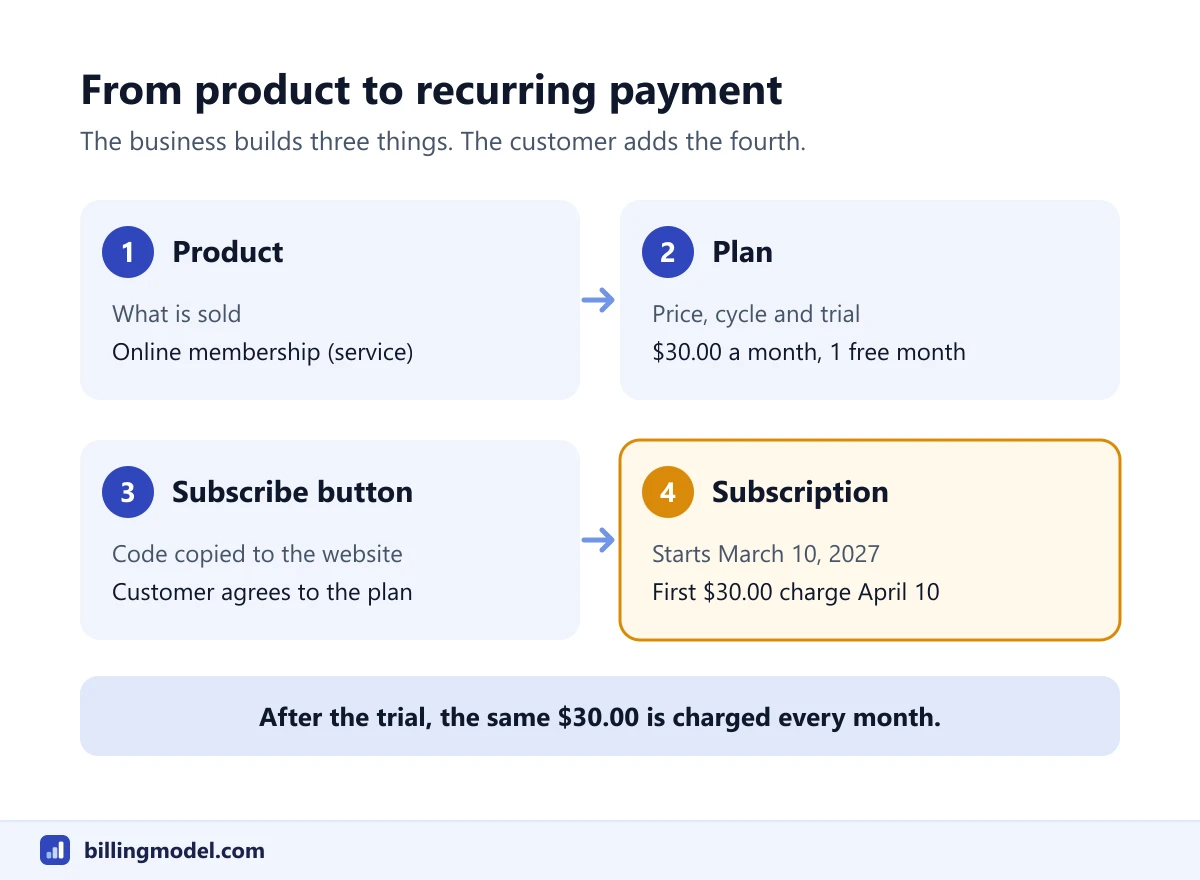 The three things a business builds, and the subscription a customer creates from them.
What the customer sees, and how they cancel
After selecting the button, the buyer logs in, reviews the price and billing cycle and selects Agree & Subscribe, according to PayPal's guide to adding subscriptions to a website (last updated October 1, 2026). The merchant FAQs say subscribers can pay with PayPal, or with a card or bank account through a guest flow if they have no PayPal account.
Customers may not use the word subscription. PayPal's help page on automatic payments (no date shown, checked October 2026) says an automatic payment is also known as a subscription, billing agreement or recurring payment. A customer writing to you may use any of the four.
For payers, the same page gives the place to look on the PayPal website: Settings, then Payments, then Subscriptions and saved businesses or Automatic Payments, then the merchant. From there, it says, you can cancel the automatic payment or change the backup payment method.
On your side, the FAQs say you pause a subscription from Subscriptions by opening the subscription profile and selecting the button next to "Paused". Customers can also change their quantity, or switch to another plan for the same product, in which case the new plan's terms take effect in the next cycle.
Cancellation has a legal side that PayPal's settings don't replace. The US Consumer Financial Protection Bureau tells consumers that cancelling an automatic payment "does not cancel what you owe". Visa's policy for subscription merchants, a June 2019 notice for its regions outside Europe, requires merchants that offer free trials or introductory offers to provide an easy way to cancel online. Rules differ by country, so have a lawyer confirm what applies to your customers.
What happens when a PayPal subscription payment fails
PayPal's page on payment failures and recovering balances (last updated September 14, 2026) sets out the sequence:
- PayPal retries the payment every 5 days, up to twice per billing cycle.
- If the retries fail, the amount is added to the outstanding balance for the next billing cycle.
- When a subscription exceeds the plan's payment failure threshold, it is suspended. The help FAQs use the word paused.
- You can capture an outstanding balance, in full or in part, once the subscription is suspended.
- If the subscriber cancels with a balance outstanding, PayPal stops retrying, and you can settle offline or capture the payment.
PayPal's own example is a $10 monthly plan with a threshold of 2. The February 1 payment fails, PayPal retries on February 5 and February 10, and after those fail the subscriber is charged $20 on March 1. When that fails too, the subscription is suspended. The first retry in that example comes 4 days after the failure, not 5, so read "every 5 days" as approximate.
That is PayPal's built-in recovery. What you tell the customer, and when access changes, is still your decision. The guide to handling a failed payment has a message and a schedule to adapt.
What PayPal charges on subscription payments
PayPal's US merchant fees page (last updated October 1, 2026, checked October 2026) has no separate row for payments received through a subscribe button. The rows a subscription payment could fall under are these.
| Row on PayPal's US fee page | Rate | On a $30.00 payment |
|---|---|---|
| PayPal Checkout | 3.49% + fixed fee | $1.54 |
| Standard Credit and Debit Card Payments | 2.99% + fixed fee | $1.39 |
| Additional fee for international commercial transactions | 1.50% | $0.45 more |
The fixed fee for US dollar transactions is $0.49. The last column is this article's arithmetic: $30.00 × 3.49% = $1.047, plus $0.49, rounds to $1.54. At 2.99% it is $0.897 plus $0.49, or $1.39. In the example above, at the PayPal Checkout rate, the $30.00 and $60.00 charges would cost $1.54 and $2.58, which is $4.12 on $90.00 collected. Which row applies depends on how the subscriber pays, so check a real transaction in your account.
Disputes are priced separately. The same page lists a $20 chargeback fee for card payments made outside a PayPal account or guest checkout, and a $15 standard or $30 high-volume dispute fee for PayPal checkout transactions. The guide to the chargeback fee compares these with other providers' published fees.
Frequently asked questions
Do I need a developer for setting up PayPal recurring payments?
Not according to PayPal's overview, which says the dashboard route needs no code beyond pasting the button it generates into your site. The API route is for businesses that want to create plans and subscriptions from their own software.
Can I offer a free trial on a PayPal subscription?
Yes. PayPal's merchant FAQs say you can define up to 2 trial periods with free or discounted pricing, and its example runs $0 for the first month, then $4.99 for two months, then $9.99. If you offer one, read the card networks' trial rules as well.
Where does a customer find a PayPal subscription to cancel it?
PayPal's help page points payers to Settings, then Payments, then Subscriptions and saved businesses or Automatic Payments. The page says the automatic payment can be canceled there. Whether that also ends the customer's contract with you depends on your own terms.
What is a billing agreement in PayPal?
PayPal's help page uses it as another name for an automatic payment, alongside subscription and recurring payment. The page describes it as saving PayPal as the way a customer pays a merchant, including for transactions scheduled in advance.
Does PayPal retry a failed subscription payment automatically?
Yes. PayPal's documentation says it retries every 5 days, up to twice per billing cycle, and then adds the unpaid amount to the next cycle's balance. The subscription is suspended once failures pass the threshold set on the plan.